Noji vs Anki
Introduction
Choosing a flashcard app is about more than features: it’s about finding a tool you’ll enjoy using every day. Noji brings together spaced repetition, easy card creation, and collaboration in a clean, modern app. Here’s how it compares with Anki, from your first flashcard to your daily study routine.
Overview
Noji
Noji brings a fresh, modern look to Spaced Repetition. It lets you create flashcards that are not only functional but also visually appealing. With an advanced SR algorithm and effective learning practices, Noji ensures your study sessions are top-notch. Plus, it’s available on all platforms and constantly updated by a dedicated professional team.
Anki, on the other hand, is an open-source flashcard system. It is available for Windows, macOS, and Linux, with AnkiMobile for iOS and AnkiDroid for Android. AnkiWeb provides synchronization across devices.
Design and Ease of Use
The user interface is crucial when choosing a learning tool, as it directly affects your experience and ease of use. Design is the first major difference you’ll notice. Both apps focus on flashcards and decks, but their design approaches are quite different.
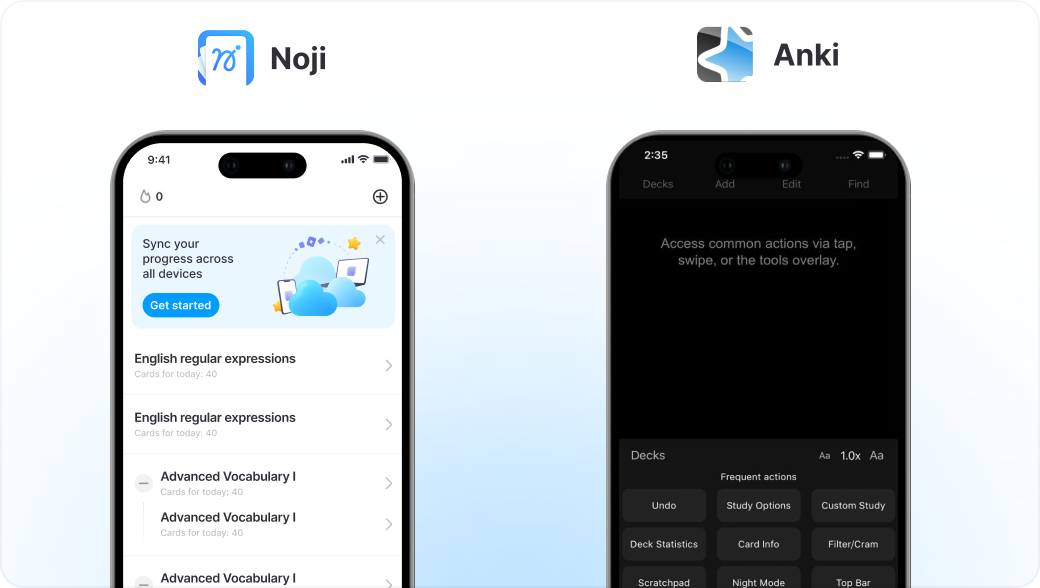
Noji stands out in this area. The app looks modern, is user-friendly, and features a clean design. It’s designed for ease of use, allowing new users to get started quickly without navigating complex menus or settings. The dashboard is straightforward, providing clear access to all features.
Anki, on the other hand, has a more utilitarian design that looks outdated. The interface is highly functional but can be overwhelming for new users due to its extensive array of options and settings. Customizing the experience can require a deeper understanding of the software’s capabilities, which might not be ideal for everyone and you can spend hours reading manuals to figure out how things work.
Creating and Studying Flashcards
In Noji, all the main features for creating cards are easy to access and use. The rich editor allows various customizations to highlight key points. You can quickly use the “Fill-in-the-blank” format, create cards from images with Image Occlusion, and enable “Reverse cards” for bidirectional learning.
Anki also supports cloze, reverse cards, and image occlusion, with editable templates for deeper customization. Noji brings these everyday study tools into an approachable editor, helping you spend more time learning and less time figuring out your setup.
Spaced Repetition
Noji makes it easy to fit spaced repetition to your goals. Choose a study preset, such as “Study languages” or “Study medical material”, to get started with settings tailored to what you’re learning. Anki also uses spaced repetition, supports FSRS alongside its legacy SM-2 algorithm, and offers reusable deck options. Noji’s focus is on making it simple to get started and keep studying.
Collaboration
Noji makes studying together simple. Share a deck with a link, choose who can edit it, and work on the same study materials with friends. Even people without a Noji account can preview shared cards. Anki offers public decks through AnkiWeb and private sharing through .apkg files, but downloaded decks do not automatically receive updates.
Noji vs Anki Comparison
To help you choose the right app for your needs, here’s a side-by-side comparison of Anki and Noji. This table highlights the key features and differences between the two, so you can make an informed decision.
Features |  Noji | Anki |
|---|---|---|
| User friendly design |  |  |
| Spaced Repetition algorithm | | |
| Text-to-speech | | |
| Image occlusion | | |
| Offline mode | | |
| Algorithm presets | | |
| Advanced sharing options | | |
| Support | | |
| Beginner-friendly | | |
Pricing
Start creating and studying flashcards for free with Noji. Upgrade to Premium for more study tools and customization options.
Anki is free on Windows, macOS, Linux, AnkiWeb, and Android through AnkiDroid. AnkiMobile for iOS costs $24.99 as a one-time purchase on the US App Store.
Conclusion

If you want a flashcard app that’s easy to pick up and enjoyable to use, Noji is built for you. Create cards, review with spaced repetition, and study with friends in one modern app. Streaks, study stats, and reminders help you build a consistent routine. Anki offers deeper template customization for learners who enjoy fine-tuning their setup. With Noji, you can put that energy into learning. Try Noji for free and start building your next study deck.
Import your cards from Anki to Noji
Start using